
Make smart use of digital tools
Where was that message again — in Teams, Outlook or in the chat? And where is that document? Somewhere on the J drive, or in a Teams channel? Needless searching wastes time and energy. By working together more efficiently in the cloud, you can keep track of everything, save time and collaborate more effectively.
As part of the Smarter Digital Collaboration & Communication project, we encourage teams to establish clear agreements on the use of digital tools. By working smartly in Microsoft 365 (rather than locally on your hard drive):
- You can work anytime, anywhere
- You can always revert to previous versions (version control)
- You can work simultaneously with colleagues on a single document
Digital collaboration provides a clearer overview, reduces email traffic and makes collaboration more efficient. This improves your work-life balance and that of your colleagues.
Make clear agreements as a team
Agree clearly and explicitly on which tools to use for what purpose and where documents should be stored. This will help prevent confusion and overlapping versions.
- Which tools to use for what?
For example: Teams chat for quick questions, Outlook for formal or external communication. - Where to store documents?
For example: project documents in the Teams channel, not on the J drive. - How to prevent overlapping versions?
Work together in a single shared document instead of emailing attachments back and forth.
Clear agreements ensure greater clarity, less confusion and efficient collaboration.
Basic agreements for the use of 365 Tools
Which tools should you use and when, and how do they fit together logically? Together with the ISSC and consultancy firm AVK, we have drawn up some guiding principles. Take a look at the visual outlining these principles — as a guide and a common language for our faculty and university.
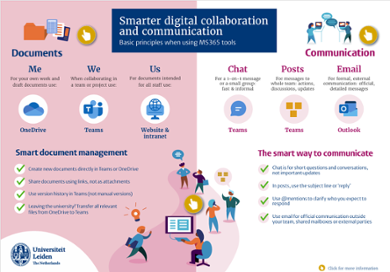
Smart use of digital tools
This will help you work together more quickly, efficiently and enjoyably:
- Share more, email less
Share a link to a document in Teams instead of sending an attachment. - The right tool for the right purpose
Use chat for quick questions, posts for team updates and Outlook for formal and external communication. - Collaborate in designated channels
This ensures communication remains easy to find and clear for everyone.
>> Check out our toolkit with tips & checklists
Inspiration session and training courses
Want to find out what smarter collaboration can do for you? Watch this beginner-friendly inspiration session (in Dutch) and discover practical tips you can apply immediately. Or dive deeper and take a training course.